SeatMap — Floor Plan Reservation System
Upload a floor plan, draw the tables, seats or spaces, and take reservations on your own site or any other site with one script tag. Self-hosted, one-time purchase.
Overview
SeatMap is a standalone Laravel application. It has three parts:
- Admin panel (
/admin) — the map builder, reservations, settings, team. - Public pages — a front page listing your venues and one booking page per map.
- Embed widget — the same booking page rendered inside an auto-sizing iframe on any website (WordPress, Shopify, Webflow, Wix, plain HTML).
Requirements
| Item | Minimum |
|---|---|
| PHP | 8.2 or newer (tested up to 8.4) |
| Database | MySQL 8.0+ or MariaDB 10.6+ |
| PHP extensions | PDO MySQL, mbstring, OpenSSL, fileinfo, JSON, GD (or Imagick) |
| Web server | Apache with mod_rewrite, or Nginx. HTTPS recommended (required for Stripe). |
| Build tools | None. Composer dependencies and the builder bundle are included. |
Installation
- In your hosting panel create an empty MySQL database and a user with full rights on it. Note the name, user and password.
- Upload
Application/seatmap.zipto the server and unzip it. You get a folder namedseatmap. - Point the domain or subdomain at
seatmap/public. In cPanel: Domains → Document Root. - Open the domain in a browser. The installer starts automatically: it checks the server, asks for the database and creates your owner account.
- You land in the admin. Click Maps → Load example maps to see six ready-made venues, or New map to start from your own plan.
seatmap folder into public_html instead. The included root .htaccess forwards every request to public/. Sub-folders work too: public_html/booking serves at https://your-domain.com/booking.root /path/to/seatmap/public; and the standard Laravel try_files $uri $uri/ /index.php?$query_string; location.Folder permissions
The web server user must be able to write to storage/ and bootstrap/cache/ (and to .env during installation). The installer's first screen tells you if something is not writable.
Cron
Add one line to the server's crontab so nightly jobs run (unpaid-hold expiry, GDPR anonymisation):
* * * * * cd /path/to/seatmap && php artisan schedule:run >/dev/null 2>&1
Without it the app still works; only those background jobs are skipped.
Updating
- Back up the database and the
storage/folder. - Unzip the new
seatmap.zipover the existing files. Keep your.envandstorage/— they hold your settings and uploads. - Open
https://your-domain.com/admin. Pending database changes are applied on the first request; if a screen asks you to runphp artisan migrate --force, run it once from the server.
Maps & the builder
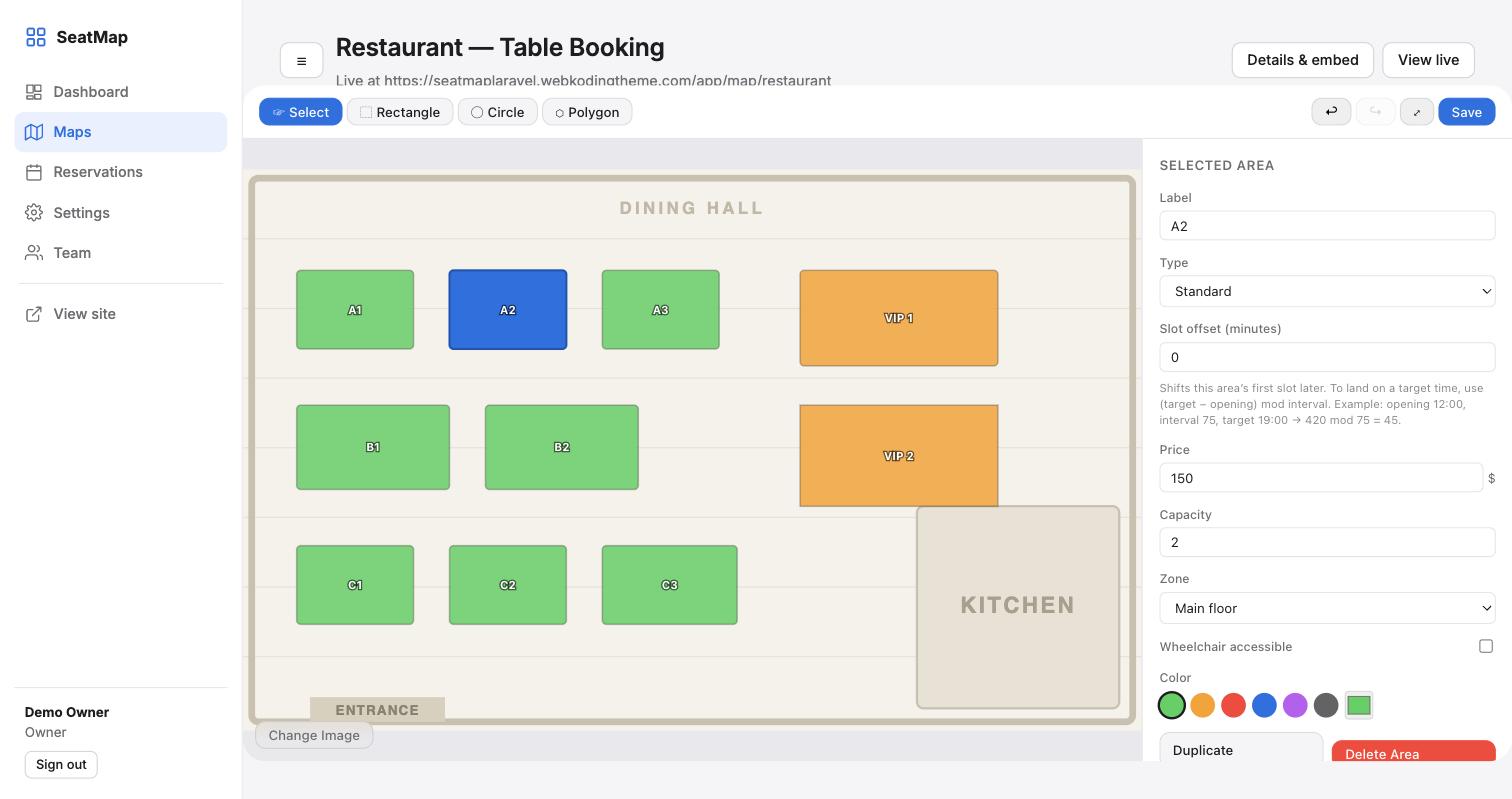
A map is one floor plan with its own areas, hours and prices. Open Maps → New map, give it a name and pick a booking mode; the builder opens.
- Upload a floor plan (top-right of the canvas): JPG, PNG or WebP. No image? Draw on the blank grid.
- Draw with Rectangle, Circle or Polygon. Click an area to edit its label, type, price, capacity, zone, wheelchair flag and colour in the Area tab. Drag to move, Duplicate to copy.
- Generate a grid (All areas tab) lays out rows × columns of seats in one go — for cinemas and theatres.
- Select several with Shift/Ctrl-click and change their price, type or colour at once.
- Zoom with the −/+ control or Ctrl + mouse wheel; Snap keeps everything on a 1% grid.
- Save is on the toolbar (or Ctrl+S). The button turns "Saved" when nothing is pending; leaving with unsaved changes asks first.
- Details & embed (top-right) sets the title, URL slug, description, cover photo and Published. Unpublished maps are invisible to visitors.
Booking modes
| Mode | Visitor picks | Typical use |
|---|---|---|
| Date & time | a day and a time slot | restaurants, salons, courts |
| Date only | a day | theatres, events, whole-day desks |
| Date range | a start and an end day | sunbeds, rentals, long stays |
| Instant | nothing — books for now | parking, walk-in desks |
Set it under Map settings: "Require date selection", "Require time selection", "Allow date range". "Allow multi-select" lets one booking hold several areas (a row of cinema seats).
Hours & pricing
- Time slots: opening, closing and slot length per map (site-wide defaults live in Settings).
- Weekly schedule: mark closed days and give each weekday its own hours. Closed days are struck through in the visitor's calendar.
- Slot offset (per area): start this area's slots N minutes later than the map, e.g. 30 → 12:30, 13:30…
- Booking window and lead time: how far ahead people may book, and the minimum notice.
- Pricing rules: "weekends × 1.2", "all days in July = 250". Days and months are combined with AND; the first matching rule wins; leaving months empty means every month. The same rule engine runs in the browser and on the server, so the price shown is the price stored.
Embedding on your site
Every map has its own snippet under Details & embed. Paste it where the map should appear:
<script src="https://your-domain.com/embed.js" data-map="restaurant" async></script>
| Attribute | Meaning |
|---|---|
data-map | the map's slug (required) |
data-theme | auto (default), light or dark |
data-font | a Google Fonts family name to match your site, e.g. Manrope |
data-max-width | limit the width in pixels and centre it |
data-min-height | initial height before the map reports its own (default 320) |
The map renders in an iframe that resizes itself to its content, so it never scrolls internally. Bookings made inside it land in your admin. It does not need third-party cookies, so it books fine on any domain.
You can also link straight to the booking page: https://your-domain.com/map/restaurant, or to the front page listing all published maps.
Reservations
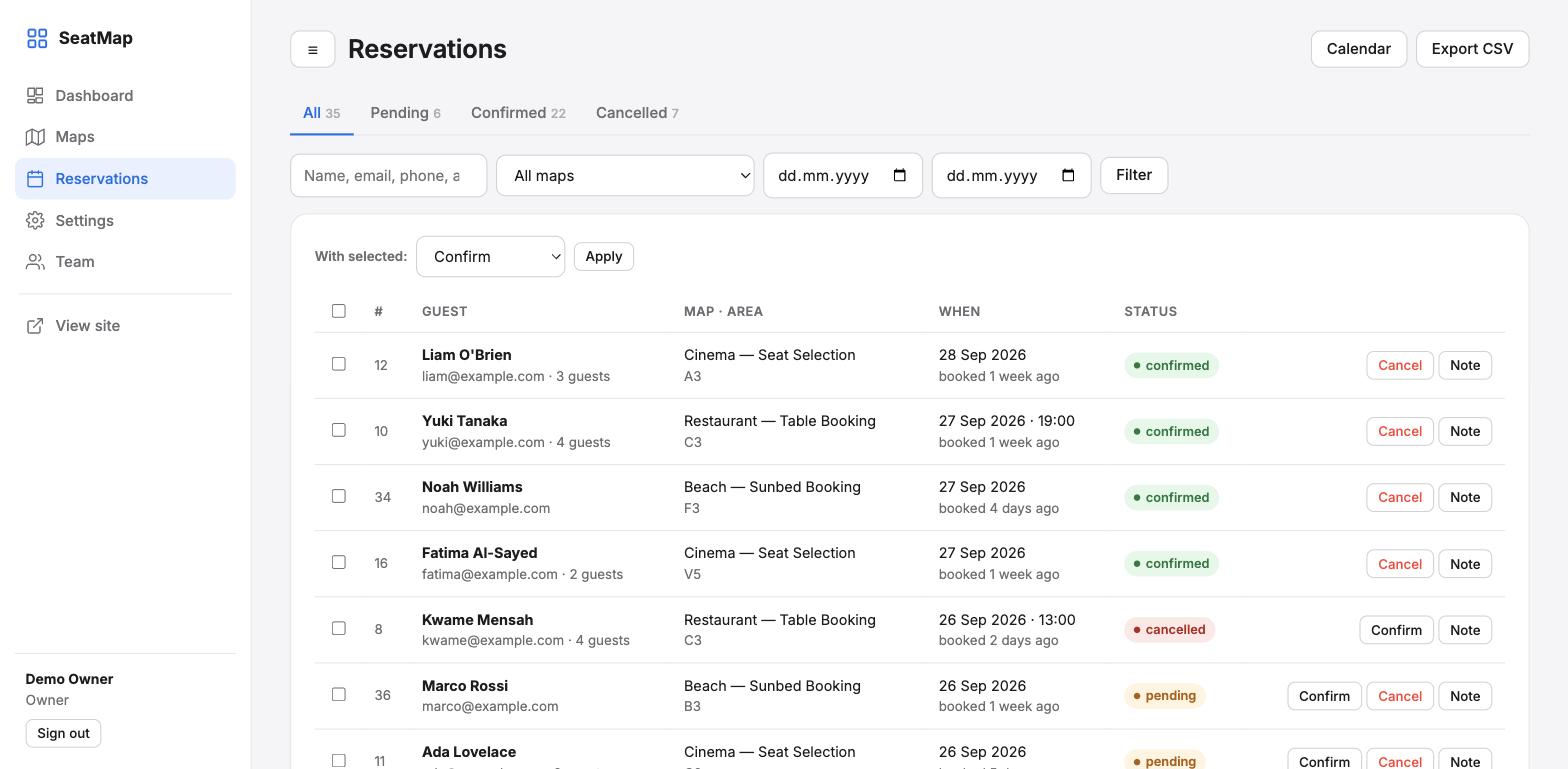
- List with tabs per status, search (name, email, phone, area, #id), map and date filters, CSV export of the current filter.
- Calendar view per month; click an entry to open it.
- Statuses: pending → confirmed / cancelled / no-show. "Unpaid" appears only when Stripe is on. Change one at a time, in bulk, or from the detail page.
- Detail page: edit the area, date, time, guest, status and internal note; see the guest's note, the timeline, seats booked together, and the guest's history; resend the email.
- New reservation: for phone and walk-in bookings; the same conflict check as the widget applies.
- The badge in the sidebar shows pending bookings and refreshes every minute.
Double bookings
Every booking is checked inside a database transaction with row locks. Two people racing for the last table: one gets it, the other is told "this area has just been reserved" and the map refreshes.
Emails
Guests receive received, confirmed and cancelled emails, each with a calendar (.ics) file and a private "view or cancel your booking" link. You receive a heads-up for every new booking.
- Settings → Email: turn sending on/off, from name/address, the address that gets new-booking alerts, the wording of the three guest emails and a footer.
- Outgoing mail server: choose SMTP and enter host, port, user, password, encryption; then Send test email. "Server default" uses the
MAIL_*values in.env; "write to log" is for testing. - Guest cancellation: allow it or not, and set the cut-off in hours before the visit.
Online payments (Stripe)
- In Stripe Dashboard → Developers → API keys copy the Secret key.
- Settings → Online payments: provider Stripe Checkout, paste the secret key, set the currency code (e.g.
USD,EUR,GBP) and whether to charge the full amount or a deposit percentage. Save. - Optional but recommended: in Stripe → Webhooks add the endpoint shown in Settings (
…/api/v1/webhooks/stripe) for the eventcheckout.session.completed, and paste the signing secret. - In each map that should charge, tick Require online payment under Map settings.
Flow: the guest fills the form → the areas are held for 30 minutes (status "Unpaid") → Stripe Checkout opens → on success the booking becomes confirmed and the emails go out. Holds that are not paid free themselves. Confirmation works even without the webhook: the return page verifies the session with Stripe.
sk_test_…) first and make a booking with card 4242 4242 4242 4242. Switch to live keys when it works. HTTPS is required.Settings & team
- Venue & branding: venue name, front-page tagline, logo, brand colour, timezone, currency, date format, week start, map colours.
- Booking rules: default hours and slot length, booking window, lead time, guest bookings, auto-confirm, phone required, guest cancellation, GDPR retention (personal data of past bookings is erased after N days).
- Team: Owners see everything; Managers see reservations only. Everyone can change their own password under My account.
Scheduled tasks
With the cron line from the installation section, these run automatically:
| Task | When |
|---|---|
| Expire unpaid Stripe holds | every 5 minutes |
| Anonymise old reservations (if retention > 0) | 03:30 daily |
Translation
All admin, widget and email strings are in lang/en.json. Copy it to lang/de.json (any locale code), translate the values — keep the keys and the :placeholders — and set APP_LOCALE=de in .env. Date names follow the same locale.
API
The widget talks to a small JSON API you can also use yourself:
| Endpoint | Purpose |
|---|---|
GET /api/v1/maps/{id}/availability?date=YYYY-MM-DD[&time=HH:MM][&date_to=…] | Reserved area ids for a day, slot or range. |
POST /api/v1/reservations | Create a booking. Requires the X-SRM-Token header from the map page (a signed 12-hour token), so writes cannot be scripted from outside a page you serve. |
GET /api/v1/reservations/{id}/calendar.ics?sig=… | Calendar file (signed link from the confirmation). |
POST /api/v1/webhooks/stripe | Stripe webhook (signature-checked). |
Troubleshooting
The installer says something is not writable
Give the web server user write access to storage/, bootstrap/cache/ and the app folder (for .env). On most shared hosts that is already the case.
Blank page or 500 after upload
Check the PHP version (8.2+) and that public/ is the document root or the root .htaccess is in place. Details are in storage/logs/laravel.log.
Emails are not arriving
Use Settings → Email → Send test email. If it fails, the error is shown. Most hosts need SMTP with authentication; port 587 + TLS is the usual combination.
The embedded map shows but booking fails
The map page must be served over HTTPS when the host site is HTTPS, and the server clock must be roughly correct (the write token is time-limited to 12 hours).
Assets look outdated after an update
Clear any server or CDN cache. Asset URLs carry a version parameter, but some CDNs ignore query strings.
Reset the installer
Delete storage/app/installed and open the site; the wizard runs again (existing data stays unless you point it at a new database).
Support
Email support@webkoding.com with your purchase code, the PHP version and the relevant lines from storage/logs/laravel.log. Support covers installation and bugs in the delivered product; customisation is outside its scope.